
Figuring out the ROI of IT outsourcing for small business can feel like trying to price peace of mind. It doesn’t show up neatly on an invoice—but it absolutely shows up in your bottom line.
The trick? Break it into simple pieces: what you spend now, what you’ll spend after outsourcing, and what problems quietly stop costing you money.
Let’s walk through it—no spreadsheet wizardry required.
Step 1: Calculate Your Current IT Costs (The “Ouch” Number)
Start with what you’re already paying for in-house IT.
Include:
- Salaries + benefits
- Tools, licenses, hardware
- Training
- Downtime and emergency fixes
Updated example:
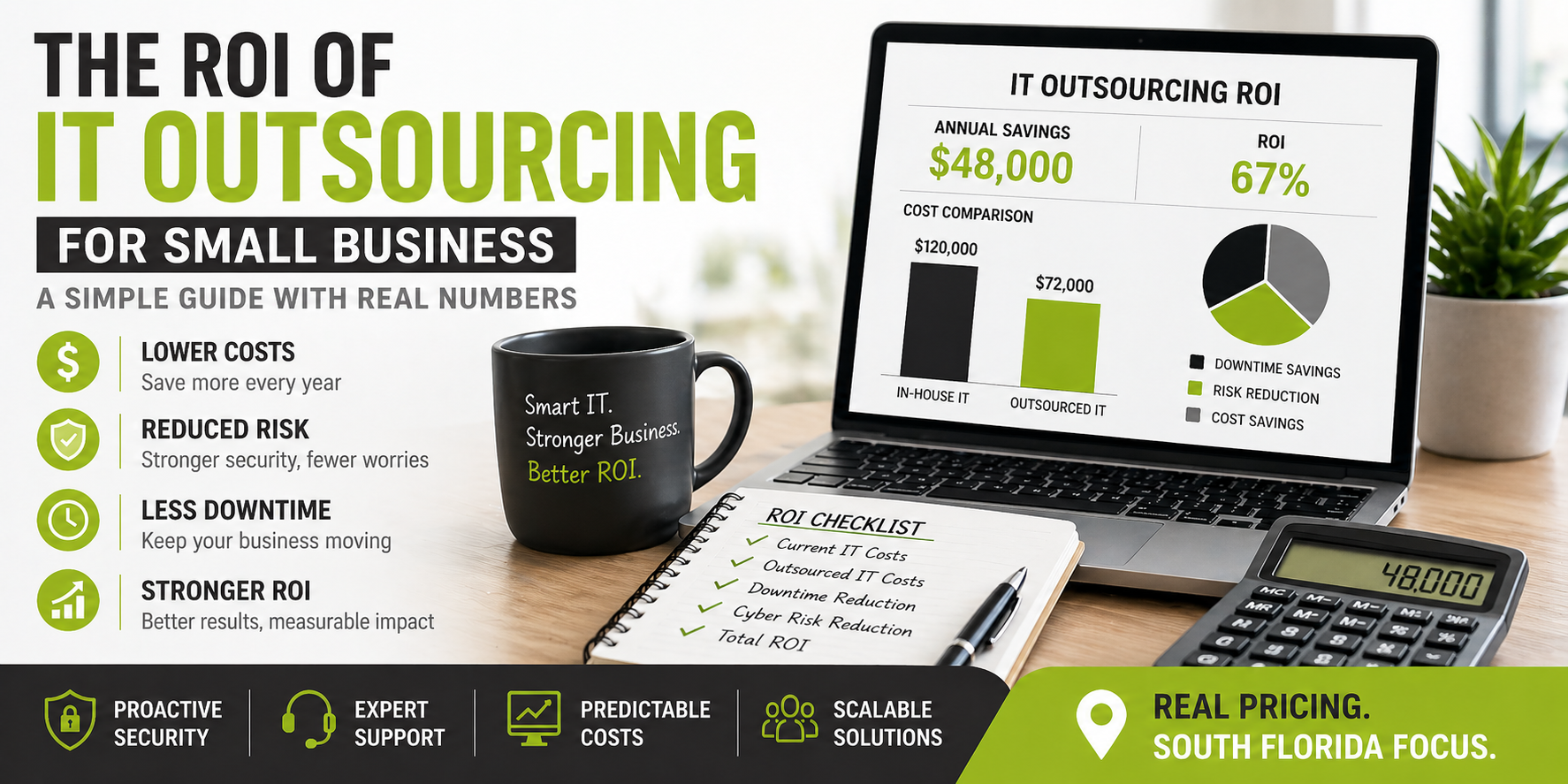
- IT manager salary: $85,000
- Tools/software: $15,000
- Downtime losses: $20,000
Total: $120,000/year
That’s your baseline—the number most businesses underestimate.
Step 2: Estimate Outsourced IT Costs (The “Realistic” Number)
Now let’s use actual South Florida pricing—not internet guesswork.
According to current benchmarks, managed IT services in South Florida typically cost $160–$250 per user/month. If you want a detailed local breakdown, check out our South Florida managed IT pricing guide to see what SMBs are actually paying.
Example (30 employees):
- 30 × $200/month = $6,000/month
- Annual cost: $72,000
Yes, it’s higher than the “cheap MSP” ads you’ve seen. There’s a reason for that (we’ll get there).
Step 3: Factor in Downtime Reduction (The Silent Budget Killer)
Downtime doesn’t send invoices—but it absolutely charges you.
Example:
- 40 hours/year × $500/hour = $20,000 lost
With a properly managed environment, downtime is often reduced significantly thanks to:
- Proactive monitoring
- Patch management
- Faster response times
Conservative savings: ~$10,000/year
Step 4: Put a Price on Cyber Risk (Yes, This Counts)
Cybersecurity is where cheap IT gets expensive—fast.
Without proper protection, even a small incident can lead to:
- Business interruption
- Data loss
- Insurance issues
Simple model:
- Estimated risk exposure: $50,000
- Reduce risk by ~50% with proper controls
Estimated value: $25,000 in risk reduction
This isn’t “extra savings”—it’s avoided damage.
Step 5: Compare In-House vs Outsourced IT
Let’s line it up using realistic numbers:
In-House IT:
- $120,000/year
Outsourced IT:
- $72,000/year
-
- $10,000 downtime savings
-
- $25,000 risk reduction
Effective value: $107,000
Step 6: Calculate ROI (The Simple Version)
Here’s the formula:
ROI = (Savings – Cost) ÷ Cost
Using our updated numbers:
- Savings: $120,000 – $72,000 = $48,000
- ROI: $48,000 ÷ $72,000 ≈ 67% ROI
Not as flashy as inflated examples—but far more believable (and still very strong).
Step 7: Don’t Forget the “Soft” Benefits
This is where spreadsheets start to sweat.
Benefits of outsourcing IT include:
- Faster support (less employee downtime)
- Access to a full team vs one person
- Predictable monthly costs
- Easier scaling
Also worth noting:
That $160–$250/user range usually reflects how much responsibility the MSP actually takes on—not just support, but security, monitoring, and accountability
In other words, you’re not just paying for help—you’re paying for outcomes.
Common Mistakes to Avoid
- Using unrealistic $100/user pricing (key services are usually missing)
- Ignoring downtime costs
- Forgetting cybersecurity risk
- Comparing one salary to a full IT team
Cheap IT is like a budget parachute—technically exists, but you don’t want to test it.
The Bottom Line
Calculating ROI for IT support outsourcing cost isn’t about making numbers look impressive—it’s about making them accurate.
When you use real-world pricing and factor in:
- Downtime reduction
- Risk exposure
- Operational efficiency
IT outsourcing for small business still delivers a strong return—just without the wishful thinking.
And more importantly, it buys:
- Stability
- Security
- Predictability
Which, in most businesses, is worth more than squeezing every last dollar out of the spreadsheet.

